Turabian Title Page: Format, Example & Student Paper Template
A Turabian title page centers the title a third down the page, with your name, course and date lower. Exact spacing, a full example and Word setup steps.
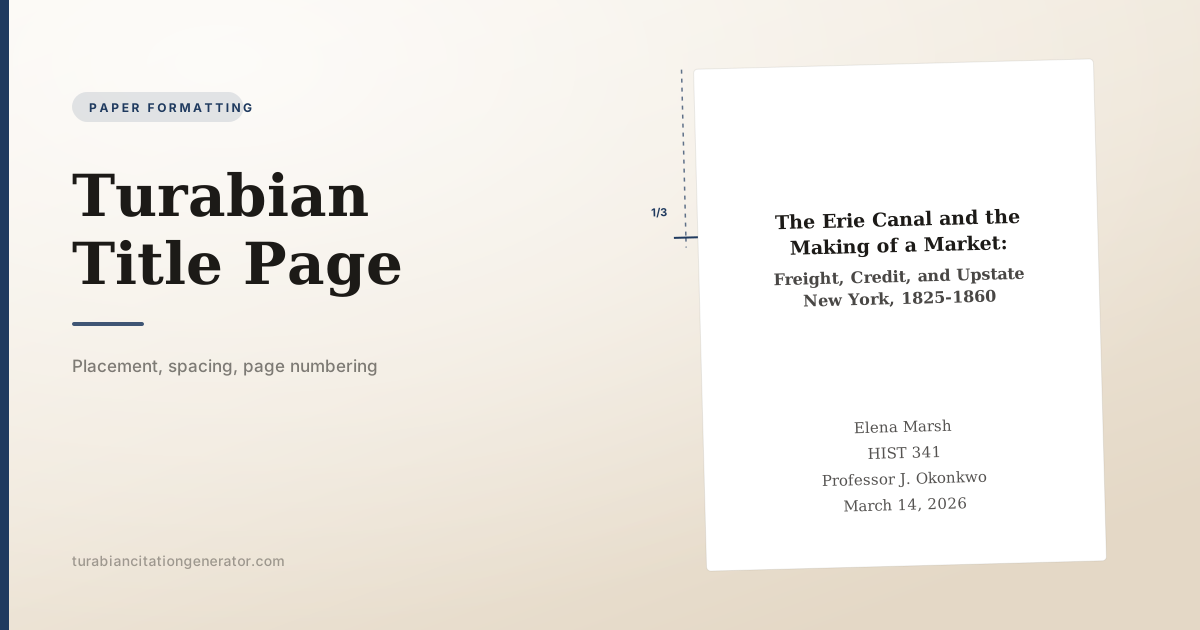
A Turabian title page carries the title centered about one-third of the way down the page, in headline-style capitalization and bold, with your name, course information and date centered below. The page is counted as page one but shows no page number. Everything uses the same font as the body text, though the University of Chicago Press tip sheet allows the title to be two or three points larger.
Here is the whole layout in one view:
The rest of this page explains each element, the spacing between the blocks, how to set the page up in Word so the number does not appear, and the differences between a class paper title page and a thesis title page.
The elements, in order
| Element | Required? | Notes |
|---|---|---|
| Title | Yes | Centered, headline-style capitalization, about a third down |
| Subtitle | If you have one | On the line below, after a colon on the title line |
| Your name | Yes | Centered, in the lower block |
| Course number and name | Usually | Follow the format on your syllabus |
| Instructor’s name | Usually | With their title, as they use it |
| Date | Yes | Written out: March 14, 2026 |
| Institution or department | Sometimes | Common in seminaries and graduate programs |
| Page number | No | The title page is never numbered |
Turabian describes a student title page in terms of what appears and roughly where, not as a grid with fixed measurements. The University of Chicago Press publishes a free set of student paper-formatting tip sheets, one of which is a marked-up title page, and its guidance is the basis for this article. That sheet also says plainly that directions from your teacher, instructor or dissertation office override the general guidelines, which is why university templates differ from one another while all being correct.
Placing the title
Center the title horizontally and start it about one-third of the way down the page. On a standard letter-size page with 1 inch margins and double spacing, that lands around the tenth to twelfth line.
Do not create the space by pressing Enter repeatedly if you can avoid it. Pressing Enter works, but the spacing shifts whenever you change the title’s length. A cleaner approach is to put the title in its own paragraph and set a large Space Before value in the Paragraph dialog, which keeps the position stable.
Capitalization is headline style: capitalize the first and last words, and all major words in between. Articles, coordinating conjunctions and prepositions stay lowercase unless they begin or end the title.
The Erie Canal and the Making of a Market
Not:
The erie canal and the making of a market
Bold. The Press tip sheet says to make the main title and subtitle bold, so bold is the default rather than merely a common habit. All capitals appear in some institutional templates and is not part of the general guidance; use it only where a template asks for it.
Size and font. Use the same font as the main text. The tip sheet allows the title to be two or three points larger than the body text, so a 14 or 15 point title above 12 point body text is within the guidance. Keeping it at body size is also fine, and a template may specify one or the other.
No period at the end of the title, and no quotation marks around it. Italicize only words that would be italicized anywhere else, such as the title of a book you are discussing or a non-English term.
Titles with a subtitle
End the main title with a colon, then put the subtitle on the next line:
The Erie Canal and the Making of a Market:
Freight, Credit, and Upstate New York, 1825-1860
Both lines are centered, double-spaced, and capitalized the same way. If a title is long enough to run past the margins, break it at a logical phrase rather than letting it wrap at a random word, and keep the lines roughly balanced in length.
The lower block
Several lines below the title, centered, comes the information that identifies you and the assignment. Turabian does not fix the exact number of blank lines; the visual goal is a clear separation, with the block sitting in the lower portion of the page rather than immediately under the title.
A typical class paper block:
Elena Marsh
HIST 341: Early American Economic History
Professor J. Okonkwo
March 14, 2026
Some programs, especially in theology and graduate work, want the institution and the reason for submission as well:
Submitted to Professor J. Okonkwo
in partial fulfillment of the requirements for
HIST 341: Early American Economic History
Northgate University
March 14, 2026
Write the date out in full. “March 14, 2026” rather than “3/14/26”. Use the submission date unless your instructor asks for the date the paper was written.
Everything in this block is double-spaced and in the same font and size as the title. Do not shrink it, do not italicize it, and do not add your student number unless it was requested.
Page numbering
The title page is counted as page one of the paper, but the number is not printed on it. This is the detail most students get wrong, because Word will happily number every page unless you tell it not to.
Word, simple papers:
- Insert, then Page Number, and choose the top-right position.
- With the cursor in the header, open the Header and Footer Design tab.
- Tick Different First Page.
The number disappears from the title page and continues correctly on page two.
Word, papers with front matter. If your paper has a table of contents or other preliminary pages, those pages take lowercase roman numerals and the body text restarts at arabic 1. That requires a section break:
- Put the cursor at the end of the last front-matter page.
- Layout, Breaks, Next Page.
- In the body section’s header, turn off Link to Previous.
- Insert, Page Number, Format Page Numbers, choose arabic and Start at 1.
- Repeat in the front-matter section, choosing lowercase roman numerals.
Turabian allows page numbers in the top right or centered at the bottom. Front matter numbering is conventionally centered at the bottom. Pick one placement for the body and keep it. Our guide to the Turabian table of contents covers the front-matter sequence in more detail.
Three worked variants
The elements shift with the context. Here are three arrangements you are likely to be asked for.
A standard class paper. Title a third down, then a lower block with your name, the course and the date.
The Erie Canal and the Making of a Market
Elena Marsh
HIST 341: Early American Economic History
Professor J. Okonkwo
March 14, 2026
A seminary or divinity paper. These programmes commonly want the institution, the submission formula and the degree context, and they often specify the exact wording.
The Prophetic Critique of Ritual in Amos
A Paper
Submitted to Professor H. Adeyemi
in Partial Fulfillment of the Requirements for
THEO 512: Prophets and Prophecy
Northgate Theological Seminary
March 14, 2026
A thesis, where the template rules. The course details disappear, the degree and department appear, and the date is usually the month and year of conferral.
Freight and Credit on the Erie Canal, 1825-1860
A Dissertation Submitted to the Faculty of the Department of History
in Candidacy for the Degree of Doctor of Philosophy
Northgate University
May 2027
Every line in all three is centered and double-spaced, in the same font as the body text. The differences are in which elements appear and how the submission is described, not in the typography.
If your instructor asks for no title page
Some short assignments take a heading block on the first page of text instead. Turabian accommodates this, and the information is the same; only its position changes.
Put the block flush left at the top of the first page, above the title:
Elena Marsh
HIST 341: Early American Economic History
Professor J. Okonkwo
March 14, 2026
Then centre the paper’s title below it, in headline-style capitalization, and begin the text. In this arrangement the first page is numbered, because there is no unnumbered title page to displace the count, unless your instructor says otherwise.
Ask before choosing this format. It is a common instruction for short response papers and a common error on longer ones, and the two situations look identical until you check the brief.
Class paper versus thesis title page
The elements overlap, but the emphasis differs.
| Class paper | Thesis or dissertation | |
|---|---|---|
| Title placement | About a third down | Usually higher, per the template |
| Course details | Yes | No |
| Instructor | Yes | No, committee appears elsewhere |
| Degree statement | No | Yes, naming the degree and department |
| Institution | Sometimes | Always |
| Date | Submission date | Month and year of conferral |
| Template authority | Turabian, or the syllabus | The graduate school, always |
For a thesis or dissertation, the graduate school’s template overrides everything on this page. Departments specify line positions to the point, and a submission can be returned for a title page that does not match. Get the official template before you write a word of front matter.
Writing the title itself
The formatting is quick; deciding what the title says takes longer and matters more, because it is the first thing a marker reads.
Name the subject and the argument. “The Erie Canal” is a topic. “The Erie Canal and the Making of a Market” tells a reader what the paper claims. A title that could sit on any essay about the same period is doing no work.
Use the subtitle for scope. The main title carries the idea and the subtitle carries the boundaries: what, where and when. “Freight, Credit, and Upstate New York, 1825-1860” tells a reader exactly what they are getting.
Keep it findable. The words a reader would search for should be in it. This matters for a thesis, which will be catalogued and indexed, and it costs nothing in an essay.
Avoid the throat-clearing opener. “An Examination of,” “A Study of” and “An Analysis of” can almost always be deleted without loss.
Avoid a question, unless you answer it directly and the question is genuinely the paper’s structure.
Match the paper you actually wrote. Titles are usually drafted before the argument settles, and they frequently describe the paper the writer intended rather than the one they produced. Reread the title after the final revision.
Length is a matter of judgment rather than rule. A main title of up to about ten words with a subtitle of similar length reads well and fits on two centered lines without awkward breaks.
Common mistakes
Numbering the title page. Turn on Different First Page.
Putting the title at the very top. It sits about a third of the way down, which is what gives a Turabian title page its recognizable look.
Using a different typeface for the title. The font family stays the same as the body text, even though the title may be a couple of points larger.
Adding a period after the title. Titles do not take terminal punctuation.
Putting the subtitle on the same line without a colon. The colon at the end of the title line is what marks the break.
Left-aligning the lower block. Both blocks are centered.
Writing the date as numerals. Write it out.
Adding a header or a running head. Turabian student papers do not use one on the title page.
Ignoring the department template. A supplied template outranks the general rule, every time.
Frequently asked questions
Does a Turabian title page have a page number? No. It counts as page one but carries no printed number. Numbering becomes visible on the following page.
How far down the page does the title go? About one-third of the way down, which on a standard double-spaced page is roughly the tenth to twelfth line.
Should the title be bold or in all capitals? Bold, with headline-style capitalization. The Press tip sheet asks for the main title and subtitle in bold. All capitals is not part of that guidance and belongs only where a template requires it.
What if my paper has a subtitle? End the main title with a colon and put the subtitle on the next line, centered and double-spaced, capitalized the same way.
Do I need a title page at all? Turabian assumes one for a student research paper and most instructors expect it. Some short assignments take a heading block on the first page instead, so ask before dropping it.
Once the title page is done
The rest of the paper follows the same logic: consistent font, consistent spacing, and formatting that serves the reader rather than decorating the page. Headings come next, and their levels are covered in our guide to Turabian headings and subheadings. The end of the paper is handled in the bibliography format guide, and long quotations in the block quotes guide.
When you reach the citations themselves, the Turabian Citation Generator will build the notes and bibliography entries from the details you enter.